
Setting Up Rewarded Ads In Web Apps & Websites: A Technical Guide

What Are Rewarded Ads (and Why Should You Care)?
Rewarded ads flip the traditional advertising model on its head. Instead of interrupting users with ads they never asked for, rewarded ads let users 'opt in' to watch an advertisement in exchange for something valuable — extra content, premium features, in-game currency, or extended access.
The value exchange is simple: a user clicks "Watch a short ad to unlock this article," views a 15–30 second video (or engages with a display ad for a few seconds), and receives the promised reward. Everyone wins.
How much more? Rewarded ads routinely earns 2–3x higher CPMs than standard display in cases where testing various offers is done with discipline, with some publishers reporting up to 30x higher CPMs compared to banner ads. Advertisers pay a premium because rewarded impressions represent genuine, voluntary attention.
This guide walks you through implementing rewarded ads on a web app , game, LLM, tool, or website using basic access to Google Ad Manager (GAM) or Google AdSense; with full working code you can adapt to your own site.
Ezoic is obviously the industry standard for implementing and accessing a premium rewarded ads setup and stable of demand partners and admittedly makes this process a lot easier; however, for sites unable to access Ezoic or just learning about rewarded ads this will give you a good rundown of how they work as well.
How Rewarded Ads Work: The Technical Flow
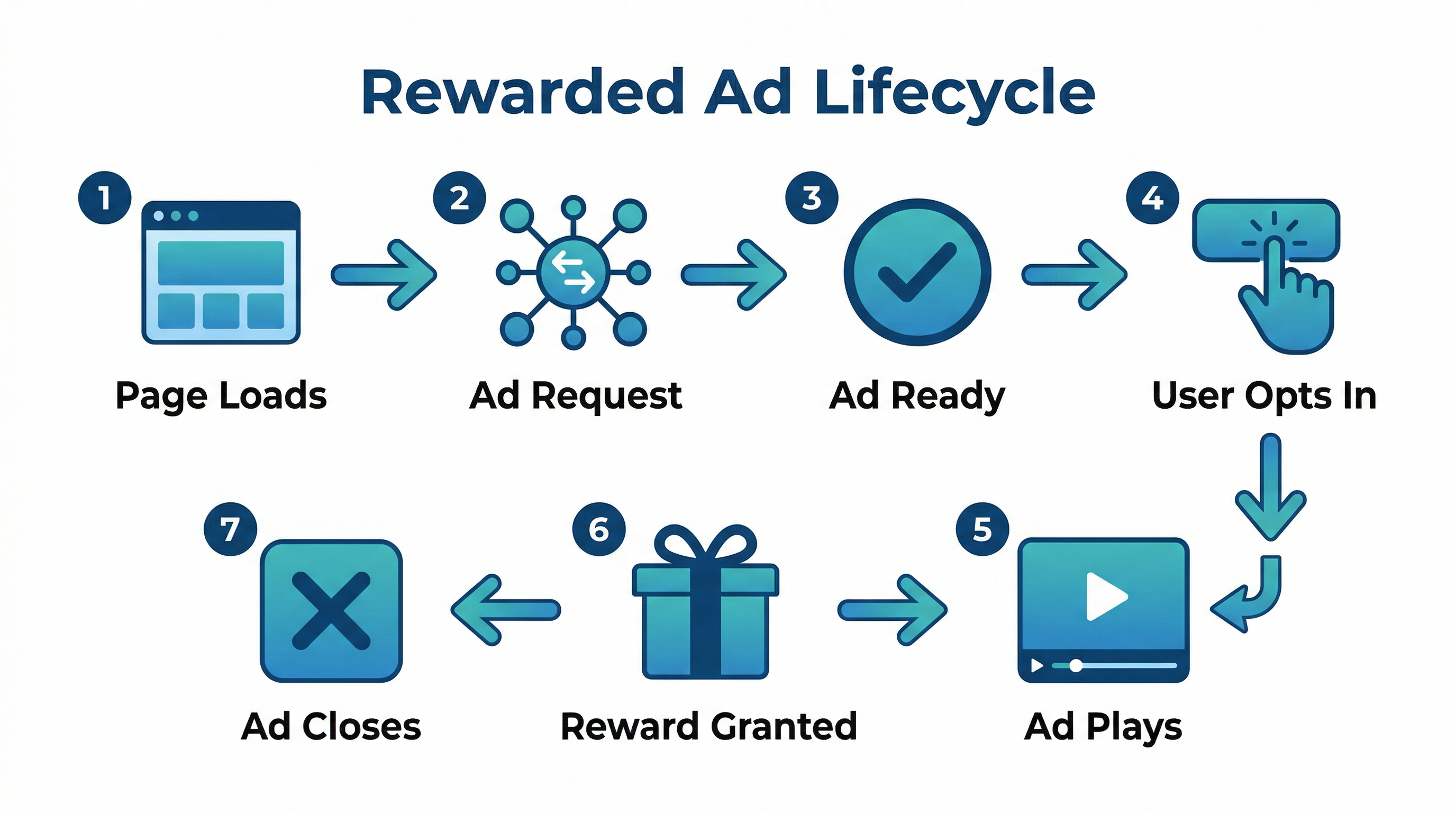
Before writing any code, it helps to understand the complete lifecycle of a rewarded ad:
- Page loads — The Google Publisher Tag (GPT) library loads and defines a rewarded ad slot
- Ad request fires — GPT sends a request to Google Ad Manager, which runs an auction across all eligible demand sources
- Ad fills — If demand exists, the ad creative loads in the background and a rewardedSlotReady event fires rewardedSlotReady event fires
- User opts in — Your site displays an opt-in prompt (a modal, banner, or button). The user voluntarily chooses to watch the ad
- Ad plays — You call makeRewardedVisible(), and the ad takes over the screen. For video, it plays to completion. For display, it must stay in view for at least 5 seconds makeRewardedVisible(), and the ad takes over the screen. For video, it plays to completion. For display, it must stay in view for at least 5 seconds
- Reward is granted — The rewardedSlotGranted event fires, carrying a payload with the reward amount and type rewardedSlotGranted event fires, carrying a payload with the reward amount and type
- User closes the ad — The rewardedSlotClosed event fires, and you deliver the promised reward rewardedSlotClosed event fires, and you deliver the promised reward
- Cleanup — You destroy the ad slot and reset the experience for the next interaction
This entire lifecycle is managed client-side through GPT's event system. There is no server-side verification for web rewarded ads (that feature is limited to mobile apps), so reward delivery must be handled in your front-end code.
Prerequisites: What You Need Before Starting
Before implementing rewarded ads, make sure you have the following:
Policy Highlights to Keep in Mind
- Users must explicitly opt in — no autoplay, no forced viewing
- You must deliver the promised reward after the ad completes
- Direct monetary rewards are prohibited — no cash, no gift cards with cash value
- Non-monetary rewards (content access, in-app items, feature unlocks) are permitted as long as they are redeemable only on your platform and are non-transferable
Path A: Implementing Rewarded Ads with Google Ad Manager + GPT+ GPT
This is the recommended approach for publishers who want full control over their rewarded ad inventory, pricing, and demand sources. It requires a Google Ad Manager account and uses the Google Publisher Tag (GPT) library.
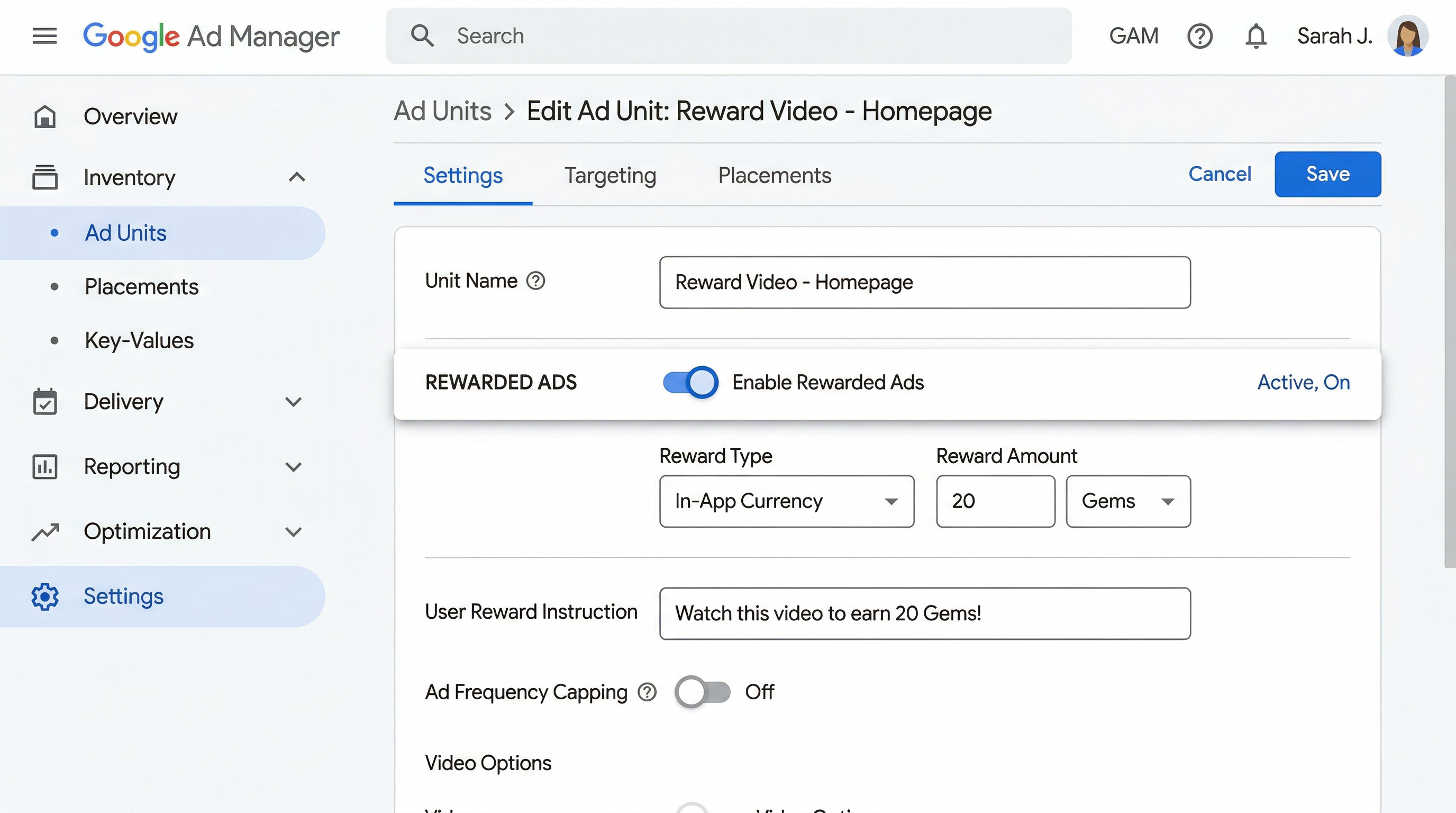
Google Ad Manager setupStep 1: Create the Rewarded Ad Unit in GAM
- Sign in to Google Ad Manager
- Navigate to Inventory → Ad Units
- Click New ad unit
- Select the appropriate parent ad unit
- Enter a unique Code — this becomes part of your ad unit path (e.g., /12345678/rewarded_web_unit/12345678/rewarded_web_unit) )
- Set the reward amount (e.g., 1) and 1) and reward type (e.g., article_access, bonus_lives, premium_contentarticle_access, bonus_lives, premium_content) )
- Save the ad unit
Note: Ad unit sizes do not impact ad serving for rewarded ads. The format handles its own rendering.
Step 2: Configure GAM Protections
This is the step most people miss. Rewarded ads use video and display demand, and a common default protection can block them entirely.
- Go to Protections in GAM
- Find the protection labeled "Block non-instream video ads"
- Make sure it is disabled/unchecked for your rewarded inventory
If this protection is enabled, VAST video creatives and video files (MP4, WebM, HLS) will be blocked from serving in your rewarded slot, and you'll wonder why your fill rate is zero.
Step 3: Create Line Items
For Reservation (direct-sold) campaigns:
- Ad type: Video/Audio
- Creative size: 1x1v (Video / VAST)
For Ad Exchange / Programmatic:
- Ad type: Display (Standard)
- Creative size: 1x1 (Custom)
Rewarded ads for web are filled through both video and display demand by default.
Step 4: Add the GPT Library to Your Page
Add the GPT script tag to the <head> of every page where rewarded ads will appear:<head> of every page where rewarded ads will appear:
<scriptasyncsrc="https://securepubads.g.doubleclick.net/tag/js/gpt.js"crossorigin="anonymous"></script>
Step 5: Implement the Rewarded Ad Code
Here is a complete, production-ready implementation. Copy this and replace the ad unit path with your own:
<!DOCTYPE html><html><head><meta charset="utf-8" /><meta name="viewport" content="width=device-width, initial-scale=1" /><title>Your Site with Rewarded Ads</title><!-- Load GPT --><scriptasyncsrc="https://securepubads.g.doubleclick.net/tag/js/gpt.js"crossorigin="anonymous"></script><script>window.googletag = window.googletag || { cmd: [] };let rewardedSlot;let rewardPayload;let adReady = false;googletag.cmd.push(() => {// Define the rewarded slot// Replace with YOUR ad unit path from GAMrewardedSlot = googletag.defineOutOfPageSlot("/YOUR_NETWORK_ID/your_rewarded_unit",googletag.enums.OutOfPageFormat.REWARDED);// CRITICAL: Always check for null// Returns null if the page/device doesn't support rewarded adsif (!rewardedSlot) {console.log("Rewarded ads not supported on this page.");return;}rewardedSlot.addService(googletag.pubads());// EVENT: Ad is loaded and ready to showgoogletag.pubads().addEventListener("rewardedSlotReady", (event) => {adReady = true;// Show your opt-in UI to the usershowOptInPrompt();// Wire up the "Watch Ad" buttondocument.getElementById("watchAdBtn").onclick = () => {event.makeRewardedVisible(); // THIS triggers the adhideOptInPrompt();};});// EVENT: Video finished playinggoogletag.pubads().addEventListener("rewardedSlotVideoCompleted",(event) => {console.log("Video completed.");});// EVENT: Reward granted to usergoogletag.pubads().addEventListener("rewardedSlotGranted", (event) => {rewardPayload = event.payload;// payload = { amount: number, type: string }console.log(`Reward granted: ${rewardPayload.amount} ${rewardPayload.type}`);});// EVENT: User closed the adgoogletag.pubads().addEventListener("rewardedSlotClosed", () => {if (rewardPayload) {// SUCCESS: Deliver the rewarddeliverReward(rewardPayload.amount, rewardPayload.type);rewardPayload = null;} else {// User closed without completing — no rewardconsole.log("Ad closed without reward.");}// Clean up the slotgoogletag.destroySlots([rewardedSlot]);});// EVENT: No ad availablegoogletag.pubads().addEventListener("slotRenderEnded", (event) => {if (event.slot === rewardedSlot && event.isEmpty) {console.log("No rewarded ad available.");// Optionally: offer alternative access or hide the prompt}});// Fire the ad requestgoogletag.enableServices();googletag.display(rewardedSlot);});// --- YOUR UI FUNCTIONS ---function showOptInPrompt() {document.getElementById("rewardPrompt").style.display = "flex";}function hideOptInPrompt() {document.getElementById("rewardPrompt").style.display = "none";}function deliverReward(amount, type) {// YOUR LOGIC: unlock content, add credits, etc.document.getElementById("lockedContent").style.display = "block";document.getElementById("lockOverlay").style.display = "none";alert(`Unlocked! You received ${amount} ${type}.`);}</script></head><body><!-- Your locked content --><div id="lockOverlay" style="background: rgba(0,0,0,0.7);color: white;padding: 40px;text-align: center;border-radius: 8px;margin: 20px;"><h2>This content is locked</h2><p>Watch a short ad to unlock this article for free.</p></div><div id="lockedContent" style="display: none; padding: 20px;"><h2>Premium Article: 10 Advanced CSS Techniques</h2><p>Here is your unlocked premium content...</p></div><!-- Opt-in prompt (hidden until ad is ready) --><div id="rewardPrompt" style="display: none;position: fixed;top: 0; left: 0; right: 0; bottom: 0;background: rgba(0,0,0,0.6);justify-content: center;align-items: center;z-index: 9999;"><div style="background: white;padding: 30px;border-radius: 12px;text-align: center;max-width: 400px;"><h3>Unlock This Article</h3><p>Watch a short ad (about 20 seconds) to getfree access to this premium content.</p><button id="watchAdBtn" style="background: #4285f4;color: white;border: none;padding: 12px 32px;border-radius: 6px;font-size: 16px;cursor: pointer;margin: 8px;">Watch Ad to Unlock</button><button onclick="hideOptInPrompt()" style="background: #eee;border: none;padding: 12px 32px;border-radius: 6px;font-size: 16px;cursor: pointer;margin: 8px;">No Thanks</button></div></div></body></html>
Code implementation example
Understanding the Key Events
Important Technical Notes
- No <div> container needed.<div> container needed. Rewarded ads generate and insert their own DOM elements. You do not need to create a container div.
- Always null-check. defineOutOfPageSlot() returns null if the page or device doesn't support the format. Failing to check will crash your script. defineOutOfPageSlot() returns null if the page or device doesn't support the format. Failing to check will crash your script.
- Always destroy slots. Call googletag.destroySlots([rewardedSlot]) when the ad closes to release resources and prevent memory leaks. googletag.destroySlots([rewardedSlot]) when the ad closes to release resources and prevent memory leaks.
- No server-side verification on web. Unlike mobile apps, web rewarded ads rely entirely on client-side events for reward delivery. Design accordingly.
Path B: Implementing Rewarded Ads with Google AdSense (Offerwall)
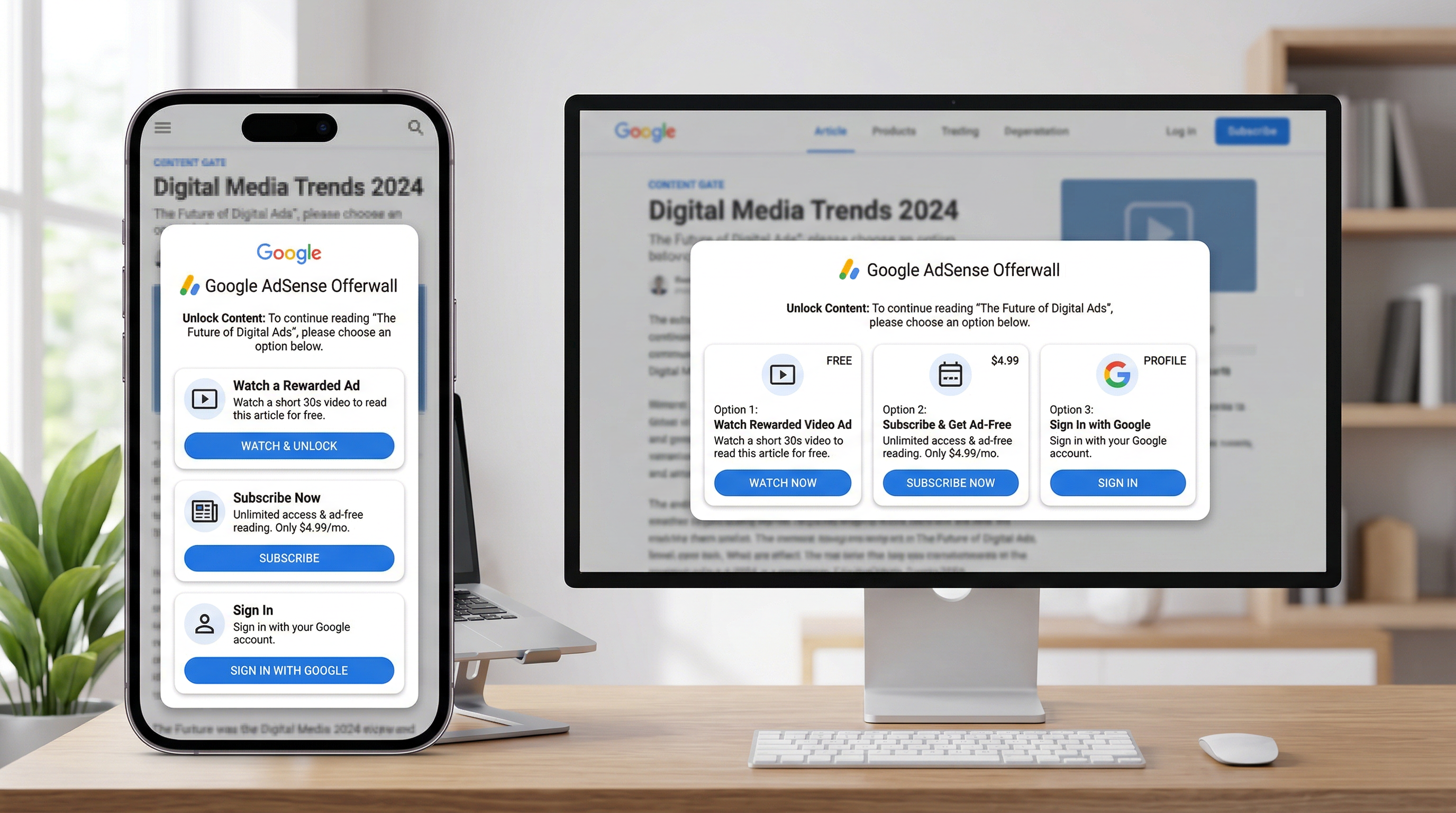
If you don't have a Google Ad Manager account, AdSense provides a simpler — though less customizable — implementation through its Offerwall feature. The Offerwall is a content-gating overlay that offers users several choices, including watching a rewarded ad.
Step 1: Access the Offerwall Interface
- Sign in to your AdSense account
- Navigate to Privacy & messaging in the left sidebar
- Find the Offerwall message type
- Click Create (first time) or Manage
Step 2: Select Your Sites
- Click Select sites
- Choose which sites should display the Offerwall
- Click Confirm
Step 3: Configure Metering
Metering controls how many free pages a user can view before the Offerwall appears:
- Set the page view threshold (e.g., "Show Offerwall after 3 page views")
- Each visitor's count resets 30 days after their first page view
- Pages where the user already gained access through a rewarded ad don't count toward the threshold
Tip: As of late 2025, Google offers Offerwall Optimization which uses machine learning to determine the optimal display frequency automatically.
Step 4: Set Up URL Targeting
Choose which pages show the Offerwall:
- Page inclusions: Only these URLs trigger the Offerwall
- Page exclusions: These URLs never show the Offerwall (e.g., your homepage, about page, contact page)
Step 5: Enable the Rewarded Ad Choice
- In the User choices section, toggle on Rewarded ad
- Configure what the user receives after watching:
- Select the languages your Offerwall should support
Step 6: Publish
Click Publish to make the Offerwall live. You can also save as a draft to review later.
What Happens Behind the Scenes
The Offerwall handles everything for you — ad loading, display, user interaction, and access granting. No additional JavaScript or code changes are required beyond the standard AdSense script tag that's already on your site.
There's one catch: the Offerwall with the rewarded ad option only appears when a rewarded ad is actually available. If there's no demand, the Offerwall simply won't render. This means you may not see it immediately in testing.
Real-World Examples: Where Rewarded Ads Make Sense
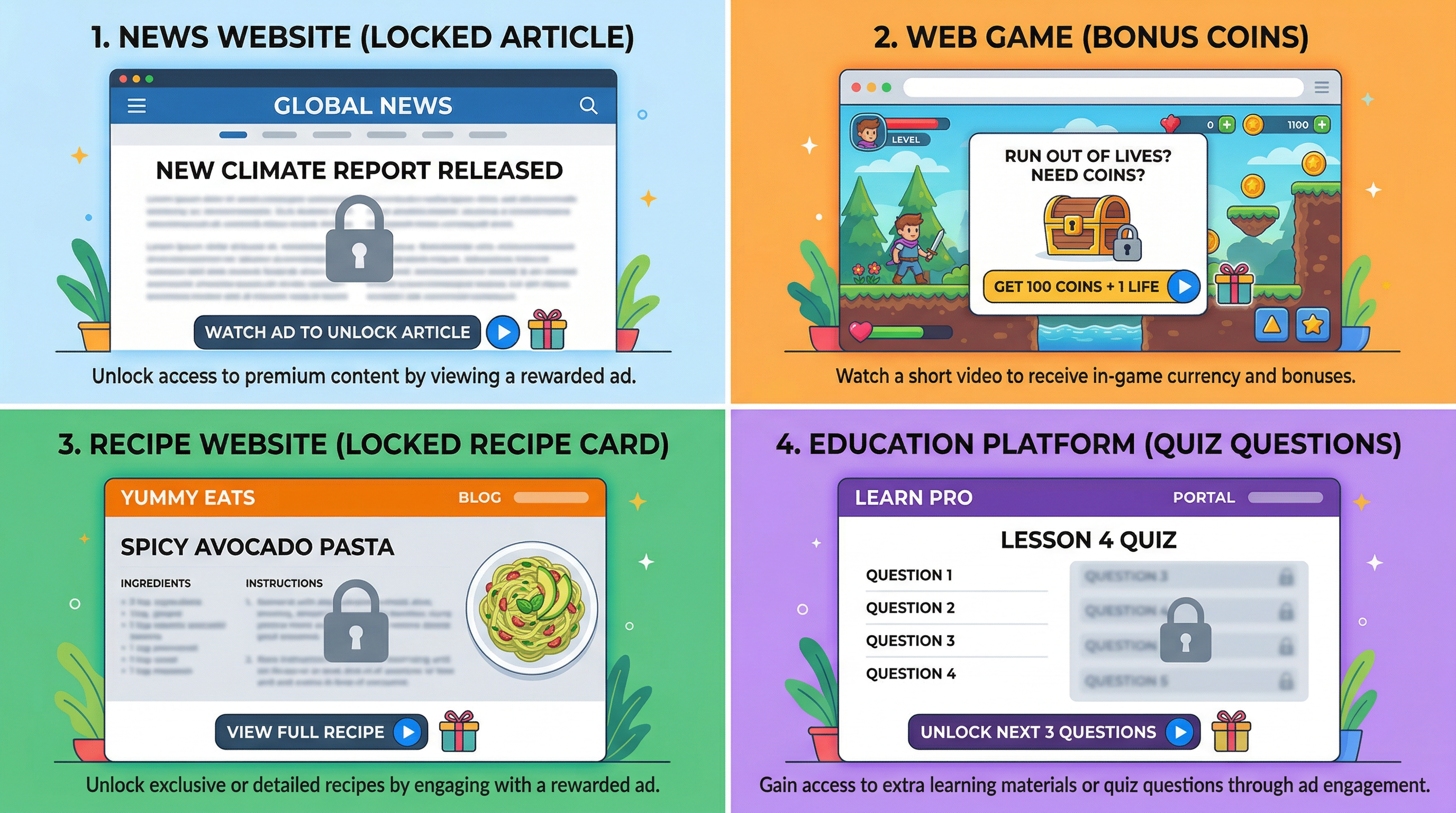
Here are practical scenarios where rewarded ads work well, along with how you'd map the reward:
News / Content Sites
- Trigger: User hits a metered paywall after 3 free articles
- Prompt: "Watch a short ad to unlock this article"
- Reward: { amount: 1, type: "article" } — unlocks the current article { amount: 1, type: "article" } — unlocks the current article
- Alternative: Offer a subscription alongside the rewarded ad option
Online Games (Web-Based)
- Trigger: Player runs out of lives or wants bonus currency
- Prompt: "Watch an ad for 20 extra lives?"
- Reward: { amount: 20, type: "lives" } — credits in-game currency { amount: 20, type: "lives" } — credits in-game currency
- Implementation: Show the prompt at natural pause points (between levels, after a loss)
Recipe / How-To Sites
- Trigger: User wants to view the full recipe or download a printable version
- Prompt: "Watch a short ad to see the complete recipe"
- Reward: { amount: 1, type: "recipe_access" } — reveals the full content{ amount: 1, type: "recipe_access" } — reveals the full content
Educational Platforms
- Trigger: User wants access to bonus quiz questions or study materials
- Prompt: "Watch an ad to unlock 5 bonus practice problems"
- Reward: { amount: 5, type: "practice_problems" } — unlocks additional content{ amount: 5, type: "practice_problems" } — unlocks additional content
Forums / Communities
- Trigger: Non-member wants to view a full thread or download an attachment
- Prompt: "Watch an ad to access this thread"
- Reward: { amount: 1, type: "thread_access" } — temporary access grant{ amount: 1, type: "thread_access" } — temporary access grant
Building a Game-Style Implementation: Step-by-Step
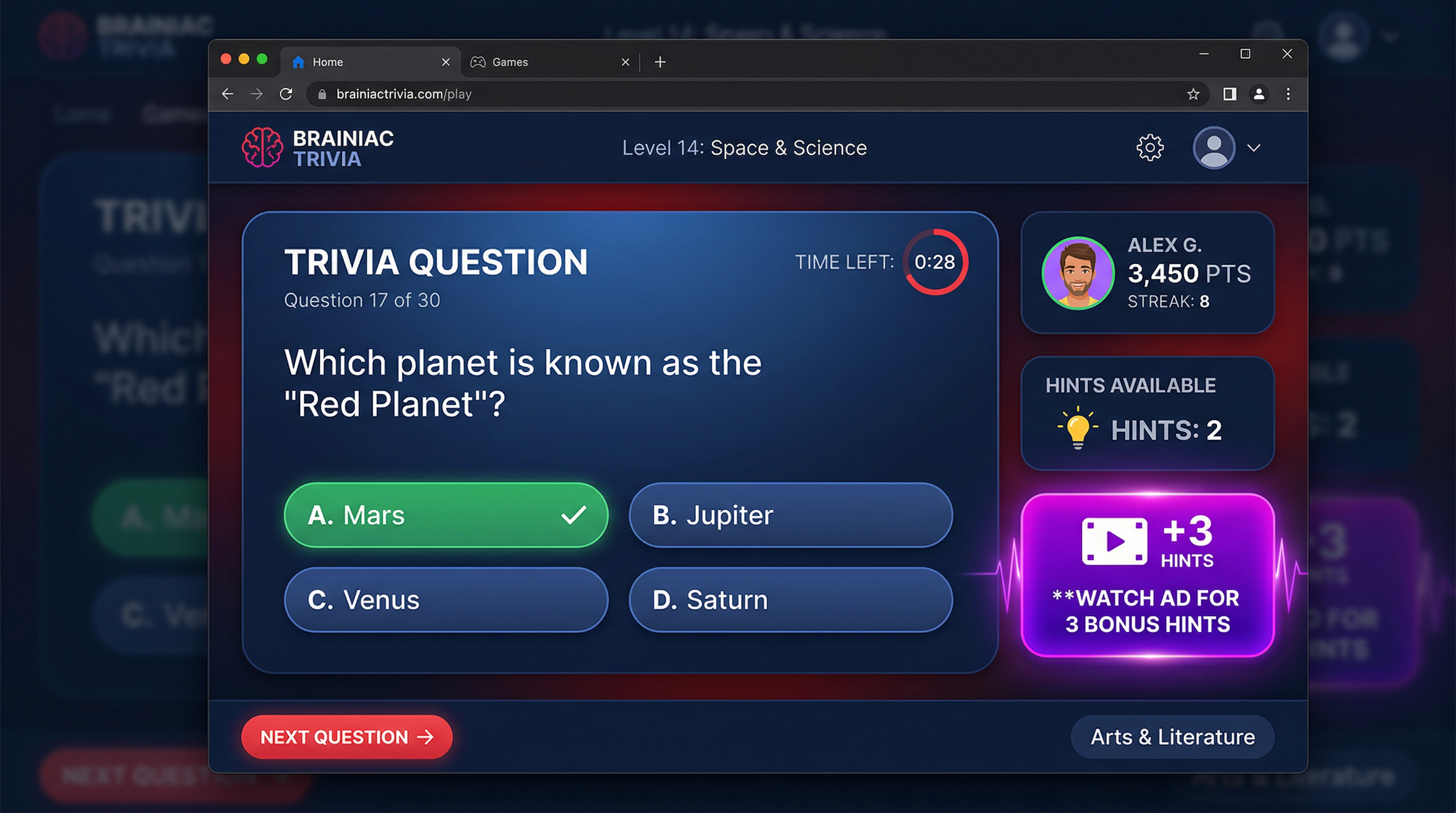
To make this more concrete, let's build a complete working example — a simple web-based trivia game where players can watch an ad to earn bonus hints.
The HTML Structure
<!DOCTYPE html><html lang="en"><head><meta charset="utf-8" /><meta name="viewport" content="width=device-width, initial-scale=1" /><title>Trivia Game with Rewarded Ads</title><scriptasyncsrc="https://securepubads.g.doubleclick.net/tag/js/gpt.js"crossorigin="anonymous"></script><style>* { box-sizing: border-box; margin: 0; padding: 0; }body {font-family: -apple-system, BlinkMacSystemFont, 'Segoe UI', sans-serif;background: #1a1a2e;color: #eee;min-height: 100vh;display: flex;flex-direction: column;align-items: center;padding: 20px;}.game-container {max-width: 600px;width: 100%;background: #16213e;border-radius: 16px;padding: 30px;margin-top: 20px;}.score-bar {display: flex;justify-content: space-between;margin-bottom: 20px;padding: 12px;background: #0f3460;border-radius: 8px;}.hint-count {color: #e94560;font-weight: bold;}.question {font-size: 1.3em;margin-bottom: 20px;line-height: 1.4;}.answers button {display: block;width: 100%;padding: 14px;margin: 8px 0;background: #0f3460;border: 2px solid #533483;color: #eee;border-radius: 8px;font-size: 1em;cursor: pointer;transition: background 0.2s;}.answers button:hover { background: #533483; }.hint-btn {margin-top: 20px;padding: 12px 24px;background: #e94560;border: none;color: white;border-radius: 8px;font-size: 1em;cursor: pointer;}.hint-btn:disabled {background: #555;cursor: not-allowed;}.ad-prompt {display: none;position: fixed;top: 0; left: 0; right: 0; bottom: 0;background: rgba(0,0,0,0.8);justify-content: center;align-items: center;z-index: 9999;}.ad-prompt.visible { display: flex; }.ad-dialog {background: #16213e;padding: 30px;border-radius: 16px;text-align: center;max-width: 400px;border: 2px solid #e94560;}.ad-dialog h3 { color: #e94560; margin-bottom: 12px; }.ad-dialog .btn-yes {background: #e94560;color: white;border: none;padding: 12px 32px;border-radius: 8px;font-size: 1em;cursor: pointer;margin: 8px;}.ad-dialog .btn-no {background: #333;color: #ccc;border: none;padding: 12px 32px;border-radius: 8px;font-size: 1em;cursor: pointer;margin: 8px;}</style></head><body><h1>Trivia Challenge</h1><div class="game-container"><div class="score-bar"><span>Score: <strong id="score">0</strong></span><span>Hints: <strong id="hints" class="hint-count">1</strong></span></div><div class="question" id="questionText">What is the capital of Australia?</div><div class="answers" id="answersContainer"><button onclick="answer(this, false)">Sydney</button><button onclick="answer(this, true)">Canberra</button><button onclick="answer(this, false)">Melbourne</button><button onclick="answer(this, false)">Brisbane</button></div><button class="hint-btn" id="hintBtn" onclick="useHint()">Use a Hint (1 remaining)</button><button class="hint-btn" id="getHintsBtn"style="background: #533483; margin-top: 10px; display: none;"onclick="requestRewardedAd()">Watch Ad for 3 Bonus Hints</button></div><!-- Rewarded ad opt-in dialog --><div class="ad-prompt" id="adPrompt"><div class="ad-dialog"><h3>Need More Hints?</h3><p>Watch a short ad to receive <strong>3 bonus hints</strong>for your trivia game!</p><br /><button class="btn-yes" id="watchAdBtn">Watch Ad</button><button class="btn-no" onclick="closeAdPrompt()">No Thanks</button></div></div><script>// --- Game State ---let score = 0;let hints = 1;// --- Rewarded Ad State ---window.googletag = window.googletag || { cmd: [] };let rewardedSlot = null;let readyEvent = null;let rewardPayload = null;// --- Initialize Rewarded Ad ---googletag.cmd.push(() => {rewardedSlot = googletag.defineOutOfPageSlot("/YOUR_NETWORK_ID/trivia_hints_rewarded",googletag.enums.OutOfPageFormat.REWARDED);if (!rewardedSlot) {console.log("Rewarded ads not supported.");return;}rewardedSlot.addService(googletag.pubads());// Ad is ready — store the event for later usegoogletag.pubads().addEventListener("rewardedSlotReady", (event) => {readyEvent = event;// Show the "Watch Ad" buttondocument.getElementById("getHintsBtn").style.display = "block";});// Reward grantedgoogletag.pubads().addEventListener("rewardedSlotGranted", (event) => {rewardPayload = event.payload;});// Ad closedgoogletag.pubads().addEventListener("rewardedSlotClosed", () => {if (rewardPayload) {hints += rewardPayload.amount;updateHintDisplay();rewardPayload = null;}closeAdPrompt();googletag.destroySlots([rewardedSlot]);});// No ad availablegoogletag.pubads().addEventListener("slotRenderEnded", (event) => {if (event.slot === rewardedSlot && event.isEmpty) {console.log("No rewarded ad available right now.");}});googletag.enableServices();googletag.display(rewardedSlot);});// --- Rewarded Ad UI Functions ---function requestRewardedAd() {document.getElementById("adPrompt").classList.add("visible");document.getElementById("watchAdBtn").onclick = () => {if (readyEvent) {readyEvent.makeRewardedVisible();closeAdPrompt();}};}function closeAdPrompt() {document.getElementById("adPrompt").classList.remove("visible");}// --- Game Functions ---function answer(btn, correct) {if (correct) {score += 10;btn.style.background = "#2ecc71";} else {btn.style.background = "#e74c3c";}document.getElementById("score").textContent = score;}function useHint() {if (hints > 0) {hints--;updateHintDisplay();// Your hint logic: eliminate two wrong answers, etc.}if (hints === 0) {document.getElementById("hintBtn").disabled = true;document.getElementById("hintBtn").textContent ="No hints remaining";}}function updateHintDisplay() {document.getElementById("hints").textContent = hints;document.getElementById("hintBtn").textContent =`Use a Hint (${hints} remaining)`;if (hints > 0) {document.getElementById("hintBtn").disabled = false;}}</script></body></html>
This complete example demonstrates how rewarded ads integrate naturally into a game experience. The ad loads in the background when the page loads. The "Watch Ad for 3 Bonus Hints" button only appears once a rewarded ad is available. The user taps it, confirms in the dialog, watches the ad, and receives their hints.
Best Practices for Rewarded Ad Implementation
Placement: Where to Trigger the Prompt
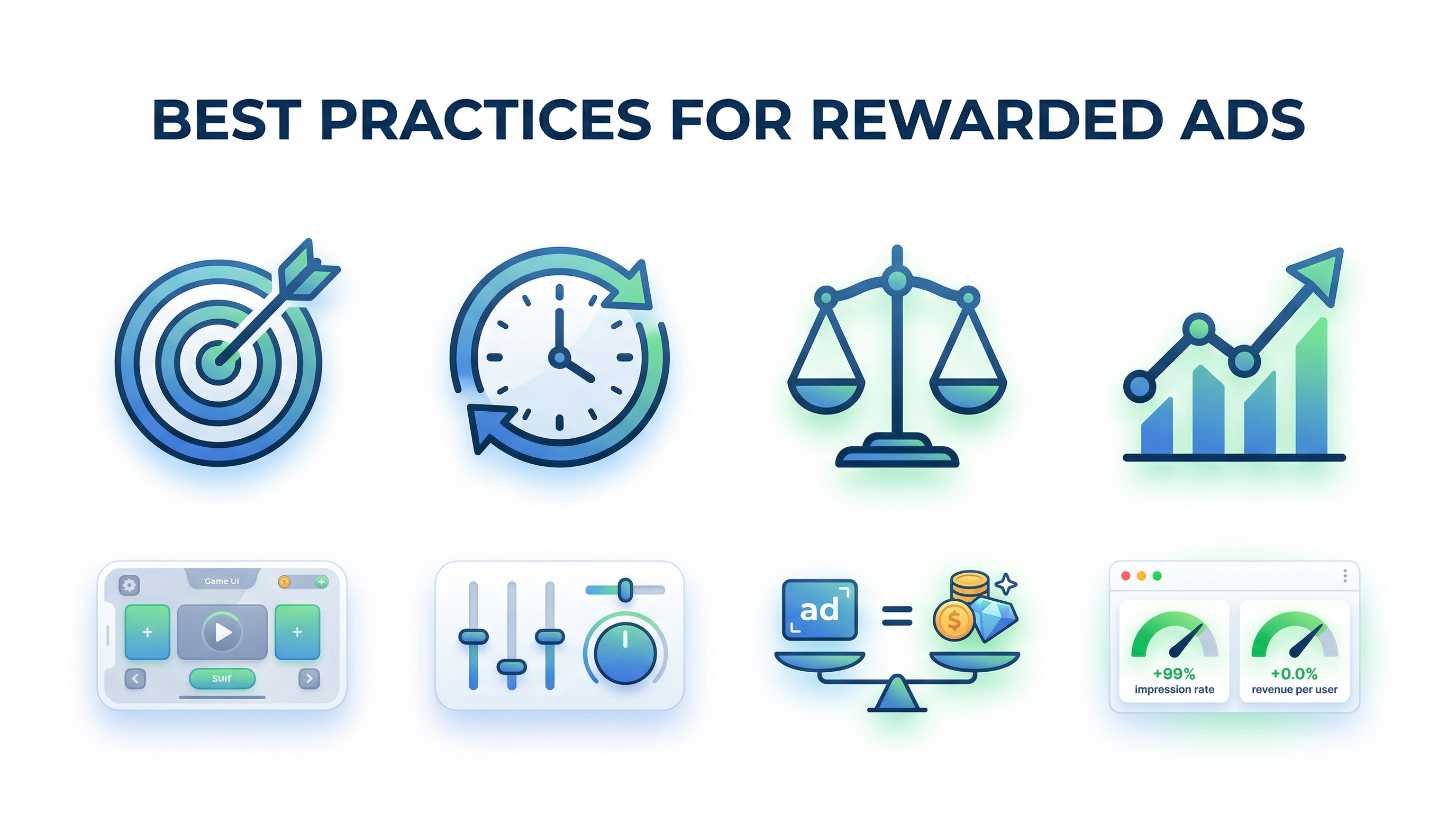
Put the opt-in prompt at natural decision points where the value exchange makes sense:
- Content gates: After a user has consumed free content and wants more
- Feature gates: Before a premium feature that non-paying users can't access
- Game checkpoints: Between levels, after losing, or when the player actively needs a resource
- Download gates: Before a PDF, template, or printable is served
Avoid placing rewarded ad prompts where they feel like a toll booth — don't gate basic navigation, search results, or content the user already started reading.
Frequency: How Often to Ask
- Don't overdo it. One or two rewarded ad opportunities per session is the sweet spot for most sites
- Never ask twice in a row. If a user declines, respect it for that session
- Rotate placement. If you have multiple gating points, vary which one shows the prompt
- Test aggressively. A/B test prompt timing, verbiage, and reward amounts to find what works for your audience
Reward Design: What to Offer
The reward must feel proportional to the user's effort. A 30-second ad for one paragraph of content feels unfair. A 20-second ad for a full premium article, a set of bonus game levels, or 24 hours of ad-free browsing feels reasonable.
Performance: Monitoring and Optimization
Track these metrics to evaluate your rewarded ad performance:
- Opt-in rate: What percentage of users shown the prompt click "Watch Ad"?
- Completion rate: Of those who start, what percentage finish? (Target: 80%+)
- Fill rate: How often is a rewarded ad available when requested?
- Revenue per session: Are rewarded ads increasing your overall session value?
- Engagement impact: Are sessions with rewarded ads longer or shorter than average?
A healthy implementation should see over 50% of users who encounter the prompt opting in, with completion rates above 80%.
Troubleshooting Common Issues
"defineOutOfPageSlot() returns null"
Cause: The page or device doesn't support rewarded ads.
Fix:
- Verify the viewport meta tag is present and correct
- Make sure the page renders at neutral zoom on mobile
- Test on a different device — some older browsers may not support the format
"No ad returned" (empty slot)
Cause: No demand available for your inventory.
Fix:
- Check that "Block non-instream video ads" is disabled in GAM Protections
- Lower your price floors or remove them temporarily for testing
- Verify the ad unit path in your code exactly matches what's in GAM
- Be patient — new ad units may take 24–48 hours to start receiving demand
"Ad plays but no reward fires"
Cause: The user may have closed the ad before completion, or the event listener is not wired correctly.
Fix:
- Confirm you're listening for rewardedSlotGranted (not just rewardedSlotClosedrewardedSlotGranted (not just rewardedSlotClosed) )
- Check that rewardPayload is being set inside the rewardedSlotGranted handler rewardPayload is being set inside the rewardedSlotGranted handler
- The reward only fires if the user watches the full video or meets the minimum display time (5 seconds for display ads)
Script conflicts
Cause: Other JavaScript on the page (analytics, social widgets, consent management) conflicts with GPT.
Fix:
- Load GPT with the async attribute (as shown in examples) async attribute (as shown in examples)
- Check the browser console for errors
- Test with other scripts temporarily disabled to isolate the conflict
Making It Even Easier with Ezoic
Everything described above — the GAM configuration, GPT library integration, event handling, and reward delivery logic — is the fundamental, manual approach to rewarded ads. It works, and for developers who want full control, it's the right path.
But if you'd rather skip the boilerplate and get rewarded ads running quickly, Ezoic's platform handles the heavy lifting. Ezoic's ad optimization technology can automatically test rewarded ad placements, manage demand sources, optimize fill rates, and A/B test different reward configurations — all without writing custom JavaScript or configuring GAM line items manually.
For publishers who want the revenue benefits of rewarded ads without maintaining the technical infrastructure, it's worth evaluating.
Summary
Rewarded ads represent one of the most user-friendly, high-CPM ad formats available to web publishers. The core implementation requires:
- A Google Ad Manager or AdSense account with a rewarded ad unit configured
- The GPT library loaded on your pages
- A few dozen lines of JavaScript to handle the ad lifecycle events
- A well-designed opt-in prompt that makes the value exchange clear
The code patterns in this guide are production-ready. Start with the basic implementation, measure your opt-in and completion rates, and iterate on placement, frequency, and reward design from there.
The users who watch your rewarded ads are choosing to be there. That voluntary attention is worth a premium — and now you know how to capture it.
For more guides on ad optimization, monetization strategies, and publisher technology, visit ezoic.com/blog.